# مدیر سامانه: تنظیمات نشریه: تنظیمات بیشتر: تنظیمات شناسه دیجیتال (DOI)

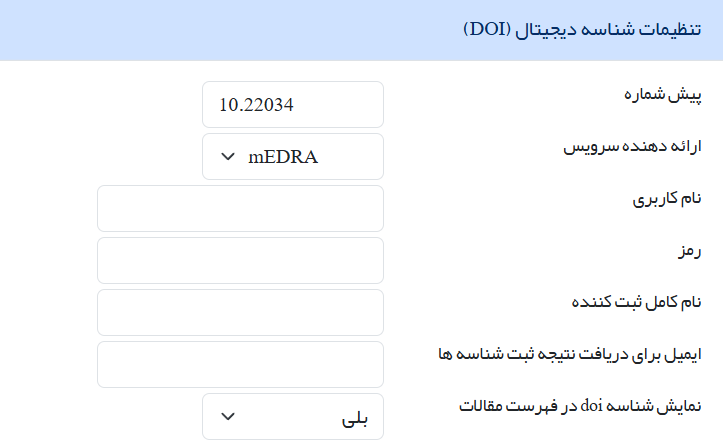
<span lang="FA" style="font-size: 14.0pt; line-height: 115%; font-family: 'B Nazanin'; font-weight: normal;">در این بخش تنظیمات مربوط به شناسه دیجیتال مطابق تصویر انجام می‌شود:</span>

[![image.png](https://bookstack.sinaweb.net/uploads/images/gallery/2025-10/scaled-1680-/SI2kkYfvBmX9TWHd-image.png)](https://bookstack.sinaweb.net/uploads/images/gallery/2025-10/SI2kkYfvBmX9TWHd-image.png)

<span dir="LTR" style="mso-no-proof: yes;"> </span>

<span style="font-size: 14.0pt; line-height: 115%; mso-bidi-font-family: Calibri; font-weight: normal;"><span style="mso-list: Ignore;">1.<span style="font: 7.0pt 'Times New Roman';"> </span></span></span><span lang="AR-SA" style="font-size: 14.0pt; line-height: 115%; font-family: 'B Nazanin'; mso-bidi-language: AR-SA; font-weight: normal;">پیش‌شماره دریافت‌شده از شرکت سیناوب را در این بخش وارد کنید.</span>

<span style="font-size: 14.0pt; line-height: 115%; mso-bidi-font-family: Calibri; font-weight: normal;"><span style="mso-list: Ignore;">2.<span style="font: 7.0pt 'Times New Roman';"> </span></span></span><span lang="AR-SA" style="font-size: 14.0pt; line-height: 115%; font-family: 'B Nazanin'; mso-bidi-language: AR-SA; font-weight: normal;">در این بخش نوع دی او آی را مشخص کنید که باید مدرا باشد. پس از انتخاب بر روی کلمه پیش‌شماره (مرحله 1) کلیک کنید.</span>

<span style="font-size: 14.0pt; line-height: 115%; mso-bidi-font-family: Calibri; font-weight: normal;"><span style="mso-list: Ignore;">3.<span style="font: 7.0pt 'Times New Roman';"> </span></span></span><span lang="AR-SA" style="font-size: 14.0pt; line-height: 115%; font-family: 'B Nazanin'; mso-bidi-language: AR-SA; font-weight: normal;">در صورت درست بودن مراحل بالا و انجام تنظیمات توسط بخش فنی شرکت، فیلدهای دیگر به صورت خودکار تکمیل می‌شود، بنابراین هیچ چیزی را در فیلدهای دیگر تایپ نکنید.</span>

<span style="font-size: 14.0pt; line-height: 115%; mso-bidi-font-family: Calibri; font-weight: normal;"><span style="mso-list: Ignore;">4.<span style="font: 7.0pt 'Times New Roman';"> </span></span></span><span lang="AR-SA" style="font-size: 14.0pt; line-height: 115%; font-family: 'B Nazanin'; mso-bidi-language: AR-SA; font-weight: normal;">اگر مایل هستید کد دی او آی هر مقاله علاوه بر نمایش در بخش نمایش مقاله در بخش فهرست مقالات هم نمایش داده شود، گزینه آخر را روی حالت بلی قرار دهید.</span>

<span lang="AR-SA" style="font-size: 14.0pt; line-height: 115%; font-family: 'B Nazanin'; mso-bidi-language: AR-SA; font-weight: normal;">در آخر حتماً دکمه ذخیره را بزنید تا تغییرات انجام شده در سامانه اعمال شود.</span>

**<span lang="AR-SA" style="font-size: 14pt; line-height: 115%; font-family: 'B Nazanin';">پرسش و پاسخ:</span>**

**<span style="font-size: 14.0pt; line-height: 115%; font-family: 'B Nazanin';"><span style="mso-spacerun: yes;"> </span><span lang="AR-SA">شناسه دیجیتال </span></span><span dir="LTR" lang="EN" style="font-size: 14.0pt; line-height: 115%; mso-bidi-font-family: 'B Nazanin';">DOI</span><span lang="AR-SA" style="font-size: 14.0pt; line-height: 115%; font-family: 'B Nazanin';"> چیست؟</span>**

<span lang="EN" style="font-size: 14.0pt; line-height: 115%; font-family: 'B Nazanin';"><span style="mso-spacerun: yes;"> </span></span>**<span lang="AR-SA" style="font-size: 14.0pt; line-height: 115%; font-family: 'B Nazanin';">پاسخ</span>**<span lang="AR-SA" style="font-size: 14.0pt; line-height: 115%; font-family: 'B Nazanin';">: <span style="mso-spacerun: yes;"> </span>شناسه یکتای دیجیتال برای مقالات - از سیناوب یا دانشگاه دریافت می‌شود.</span>